
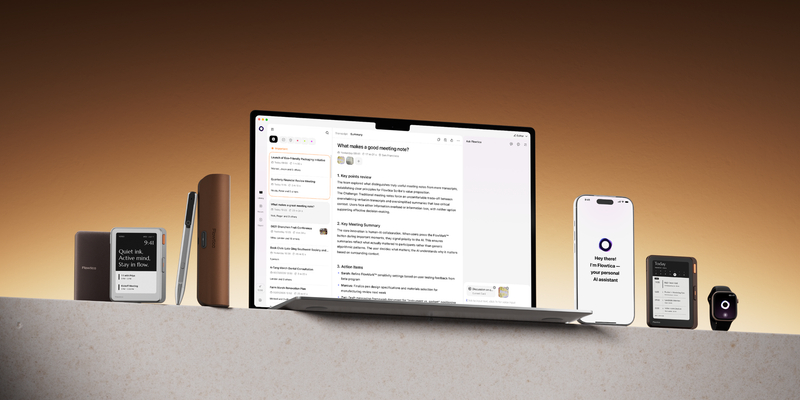
Flowtica announced the expansion of its AI-powered meeting productivity platform to Mac, Web, and Apple Watch, providing professionals with additional ways to capture and manage meeting information. The new applications enable users to record conversations and online meetings, generate searchable transcripts, create AI-powered summaries, and identify action items. Through Flowtica’s connected AI ecosystem, users can access meeting insights across multiple devices to improve productivity and collaboration.
The expansion reflects Flowtica’s commitment to providing optimized AI meeting productivity solutions for different use cases, meeting environments and workflows. Apple Watch offers convenient capture for spontaneous in-person conversations,
Mac enables professionals to record and process online meetings, and Flowtica Web brings browser-based recording and AI meeting tools to Windows and Linux users. Together with the Flowtica iPhone app and its dedicated Scribe and Verso hardware, these options help people capture what matters wherever conversations happen. Recordings and meeting notes come together in one Flowtica library.
Flowtica intelligence, now on your wrist
Flowtica for Apple Watch brings AI meeting productivity to spontaneous conversations, from impromptu client discussions and hallway exchanges to ideas shared between meetings. Users can start recording with one tap from a watch-face complication, Smart Stack or Control Center on supported devices, and mark important moments with FlowMark, including via Double Tap on compatible Apple Watch models.
A glanceable interface displays recording status, duration and markers. Recordings can be captured offline and uploaded when connectivity returns, with transcription, summaries, action items and review available through the Flowtica app on the paired iPhone.
Bringing AI-powered meeting productivity to Mac
Flowtica for Mac helps professionals capture important information during online meetings without interrupting their workflow. When the application detects meeting audio from supported services, it prompts users to confirm recording. During meetings, users can mark important moments, add notes and attach images. Afterward, Flowtica generates searchable transcripts, summaries and action items while preserving the original recording.
With Ask Flowtica, users can query recordings to identify key decisions, outstanding questions and commitments. The Mac application can also transform text and screenshots into structured memos or task lists, helping professionals organize information and move from discussion to action.
Flowtica for Mac additionally introduces system-wide voice dictation, allowing users to position their cursor in an application, hold the Fn key and speak to enter text directly.
Flowtica Web brings meeting intelligence to Windows and Linux
Flowtica Web extends AI meeting productivity to browser-based workflows. Available at web.flowtica.ai, it allows Windows and Linux users to manually record meetings through a microphone or by sharing a browser tab, window or screen with audio in Chrome or Edge. Safari and Firefox support microphone recording only.
Following recording, users can access transcripts, AI-generated summaries and Ask Flowtica to identify decisions, commitments and next steps, including through spoken questions using its voice button. Recordings are accessible through the same unified Flowtica library across devices. Unlike the Mac application, Flowtica Web does not offer automatic meeting detection or system-wide voice dictation.
A connected meeting productivity ecosystem
Flowtica’s expanded software platform complements its existing hardware portfolio, including Scribe, its AI-powered recording pen, and Verso, its MagSafe-compatible AI recording device with an integrated e-paper display. While Apple Watch supports spontaneous conversations and Mac and Web address online meeting workflows, Scribe and Verso offer purpose-built solutions for longer or more demanding in-person recording environments.
Scribe connects handwritten notes to AI-generated meeting information through its Snap It functionality, while Verso supports phone call recording and provides live meeting intelligence through its e-paper display. Both devices feature dedicated recording batteries and physical controls, allowing professionals to focus on their conversations.
Together, Flowtica’s hardware and software solutions provide flexible ways to capture information across different environments, with recordings brought together in one AI platform for transcription, summaries and actionable insights.
“The most valuable information in a working day often begins as a conversation, but those conversations happen in very different ways,” said Zac Zuo, Co-Founder of Flowtica. “Our approach is to give professionals the right solution for each situation, whether that’s an application on a device they already own or dedicated recording hardware. By connecting these experiences through one AI platform, we’re helping people capture more of what matters and turn conversations into meaningful action.”
More information: https://flowtica.ai.
Related News:
Lenovo Expands AI Library to Accelerate Enterprise AI Deployment and ROI
Propel Software CEO Identifies Five Business and Technology Trends for 2027